
Selling fast!
Get yours while you can.
Your cart
Estimated total:
$125.99 USD
Vendor Item # 6577C002


23503
Couldn't load pickup availability
The Canon EOS R1 Body represents the pinnacle of professional full-frame mirrorless photography, designed to excel in the most demanding, fast-action scenarios. Building upon the revered legacy of
…
| Type: | Digital interchangeable lens, mirrorless camera |
| Image Processor: | DIGIC X (with DIGIC Accelerator co-processor) |
| Recording Media: | (Two) CFexpress Type B card slots• compatible with CFexpress 2.0 and VPG 400 |
| Compatible Lenses: | Canon RF lens group (including RF-S lenses) When using Mount Adapter EF-EOS R: Canon EF or EF-S lenses (excluding EF-M lenses) |
| Lens Mount: | Canon RF mount |
| Type (2): | Canon designed full-frame back-illuminated stacked CMOS sensor (compatible with Dual Pixel CMOS AF and Cross-type AF) |
| Effective Pixels: | Approx. 24.2 megapixels |
| Screen Size: | Approx. 36.0 x 24.0 mm |
| Pixel Unit: | Approx. 6.00 μm square |
| Total Pixels: | Approx. 26.7 megapixels |
| Aspect Ratio: | 3:2 (Horizontal: Vertical) |
| Color Filter System: | RGB primary color filters |
| Low Pass Filter: | Installed in front of the image sensor, non-detachable |
| Dust Deletion Feature: | (1) Self Cleaning Sensor Unit• Removes dust adhering to the low-pass filter.• At power off only / Enable / Disable. Performed automatically (taking about approx. 2 sec. as indicated on the screen) or manually (taking about approx. 8 sec. as indicated on the screen).• After manually activated cleaning, the camera will automatically restart (Power OFF to ON).• When [Multi Shot Noise Reduction], [Multiple exposures], or [HDR mode] is set, [Clean now] and [Clean manually] cannot be selected. (2) Dust Delete Data acquisition and appending• The coordinates of the dust adhering to the low-pass filter are detected by a test shot and appended to subsequent images.• The dust coordinate data appended to the image is used by the EOS software to automatically erase the dust spots.• Not available with RF-S/EF-S lenses, in cropped shooting, during focus bracket shooting, in RAW burst mode, or multiple-exposure shooting. (3) Manual cleaning (by hand) |
| Recording Format: | Compliant to Design rule for Camera File system 2.0 and Exif 2.31*.*Supports time difference information in Exif 2.31. |
| Image Format: | RAW: RAW / C-RAW / JPEG / HEIF: L / M / S 1 / S 2 Movies: RAW / XF-HEVC S YCC 422 10 bit / XF-HEVC S YCC 420 10 bit / XF-AVC S YCC 422 10 bit / XF-AVC S YCC 420 8 bit |
| RAW + JPEG / HEIF Simultaneous Recording: | Simultaneous recording of any combination of RAW/C-RAW and JPEG/HEIF image-recording quality is supported. |
| Color Space: | Selectable between s RGB and Adobe RGB |
| Picture Style: | (1) Auto (2) Standard (3) Portrait (4) Landscape (5) Fine Detail (6) Neutral (7) Faithful (8) Monochrome (9) User Defined 1–3• In Scene Intelligent Auto, [Auto] will be set automatically.• [Standard] is the default setting for [User Def. 1–3].• A Picture Style file can be registered to User Def. 1/2/3. |
| Settings: | (1) Auto (Ambience priority/White priority) (2) Daylight (3) Shade (4) Cloudy*1(5) Tungsten light (6) White fluorescent light (7) Flash (8) Custom (Custom WB) (9) Color temperature Footnote*2*1: Effective also in twilight and sunset.* White balance can be adjusted during movie recording. |
| Auto White Balance: | Option between ambience priority and white priority settings, using SET button |
| White Balance Shift: | Blue/amber bias: ±9 levels Magenta/green bias: ±9 levels• Shifted from the color temperatue of the current WB mode.• Blue/amber and magenta/green shift can be set at the same time.WB Bracketing available, up to ±3 levels Blue/amber or magenta/green, via Quick Control Dial |
| Type (3): | OLED color electronic viewfinder; 0.5-inch, approx. 9.44 million dots |
| Coverage: | Approx. 100% vertically and horizontally relative to the shooting image area (with image quality L, at approx. 25 mm eyepoint). |
| Magnification / Angle of View: | Approx. 0.90 x / Approx. 41.4 degrees (with 50 mm lens at infinity, -1 m-1) |
| Eye Point: | Approx. 25 mm (at -1 m-1 from the eyepiece lens end) |
| Dioptric Adjustment Range: | Approx. -4.0 to + 2.0 m-1 (dpt)**1: Dioptric adjustment lock mechanism |
| Viewfinder Information: | (1) Maximum burst (2) Possible shots/Sec. until self-timer shoots (3) Focus Bracketing/ Multiple-exposure/HDR shooting/Multi Shot Noise Reduction/Bulb timer/Interval timer (4) Shooting mode (5) AF method (6) AF operation (7) Image quality (8) Card (9) Drive mode (10) Metering mode (11) No. of remaining shots for focus braketing, multiple exposures, or interval timer (12) Electronic level (13) Movie recording time available (14) Battery level (15) Image Stabilizer (IS mode) (16) Histogram (Brightness/RGB) (17) Quick Control button (18) Anti-flicker shooting (19) White balance/White balance correction (20) Picture style (21) Auto Lighting Optimizer (22) Still photo cropping / Aspect ratio (23) AF point (1-point AF) (24) AEB/FEB (25) View Assist (26) HDR PQ (27) Flash ready / FE lock / High-speed sync (28) Electronic shutter (29) Touch shutter / Create folder (30) AE lock (31) Shutter speed / Multi-function lock warning (32) Aperture value (33) Wi-Fi® function (34) Wi-Fi® signal strength (35) Bluetooth® function (36) Exposure simulation (37) Magnify button (38) ISO speed (39) Highlight tone priority (40) Exposure compensation (41) Exposure level indicator |
| Focus Method: | Dual Pixel CMOS AF |
| Cross type AF: | Supported* Dual Pixel CMOS AF has been vertical-line detection only with previous models, but the EOS R 1 can perform not only vertical-line detection but also horizontal-line detection by rotating the pupil division direction of the Gb pixels of the CMOS sensor by 90 degrees.* Cross-type AF functions under the conditions indicated by “Yes” in the table below during still photo shooting (not supported during movie recording).* Cross-type can be performed in the whole focusing area.* Cross-type does not function (vertical-line detection only) during movie recording, when using Preview AF, when using Focus guide, when the image flickers under fluorescent lighting, LED lighting, or other flickering light sources, and when operating the SA control ring of RF 100 mm F 2.8 L MACRO IS USM. |
| Selectable Positions for AF Point: | AF area: Horizontal: Approx. 90% x Vertical: Approx. 100%Stills: Max. 4897 positions (83 x 59) Movies: Max 4067 positions (83 x 49) |
| Focusing brightness range (still photo shooting): | EV –7.5 to 21 (with an f/1.2 lens,* center AF point, One-Shot AF at room temperature, and ISO 100)* Except RF lenses with a Defocus Smoothing (DS) coating. |
| Focusing brightness range (movie recording): | 4 K 30 p: EV – 5.5 to 21 Full HD 30 p: EV – 5.5 to 21(with an f/1.2 lens,* center AF point, One-Shot AF at room temperature, ISO 100, and 29.97 / 25.00 fps.)* Except RF lenses with a Defocus Smoothing (DS) coating. |
| Available AF Areas: | • Spot AF• 1-point AF• Expand AF area: Above/below/left/right• Expand AF area: Around• Flexible Zone AF 1• Flexible Zone AF 2• Flexible Zone AF 3• Whole area AF• Whole area tracking OFF Spot AF• Whole area tracking OFF 1-point AF• Whole area tracking OFF Expand AF area: Above/below/left/right• Whole area tracking OFF Expand AF area: Around |
| Available Subject Detection: | • Auto• People• Animals (dogs / cats / birds / horses)• Vehicles (motorsports cars or motorcycles / aircraft / trains)* Certain types of animals or vehicles may not be detected, depending on shape and appearance |
| Eye Detection: | Auto:• Selects the eye closer to the camera (as detected from the angle of the face).• At the same distance from the camera, selects the eye closer to the center of the image.Right Eye:• Prioritizes the subject’s right eye.Left Eye:• Prioritizes the subject’s left eye. |
| Metering Modes: | Real-time metering from CMOS image sensor (6144 [96 x 64] metering zones) (1) Evaluative metering (AF point-linked) (2) Partial metering (approx. 5.9% of the area at the center of the screen) (3) Spot metering (approx. 3.0% of the area at the center of the screen) (4) Center-weighted average metering |
| Metering Range: | EV -3 – 20 (at 73°F/23°C, ISO 100) (Still Photo Shooting) |
| Exposure Modes: | Shooting Mode Name Fv Flexible-priority AE P Program AE Av Aperture-priority AE M Manual exposure Tv Shutter-priority AE BULB Bulb exposure C 1/C 2/C 3 Custom shooting |
| ISO Speed Range: | Manually Set Normal ISO 100–102400 (in 1/3- or 1-stop increments) Expanded L (equivalent to ISO 50), H 1 (equivalent to ISO 204800) and H 2 (equivalent to ISO 409600) * When set to [Highlight tone priority], the available manual setting range is ISO 200–102400.* Expanded ISO speeds are not available when [HDR shooting (PQ): HDR PQ] is set.ISO Auto range settings in still photo shooting Auto Range ISO Speed Minimum ISO 100–51200 (in 1-stop increments) Maximum ISO 200–102400 (in 1-stop increments) ISO Auto details in still photo shooting No Flash Using Flash Compatible Lens Incompatible Lens ISO 100*1*2–102400*2 ISO 100*1*2–6400*2 ISO 100*1*2–1600*2 ISO 400*3 ISO 400*3 *1: ISO 200 when set to [Highlight tone priority: Enable/Enhanced].*2: Varies depending on the [Maximum] and [Minimum] settings for [Auto range].*3: If outside the setting range, changed to the value closest to ISO 400. |
| Exposure Compensation: | User-set ±3 stops in 1/3- or 1/2-stop increments AEB ±3 stops in 1/3- or 1/2-stop increments |
| AE Lock: | (1) Auto AE lock• AE is locked as soon as subjects are in focus using One-Shot AF when set to selected metering mode in [C.Fn 2: AE lock meter. mode after focus]. (2) User-set AE lock• Use the AE lock button (update by pressing the button again) in Fv, P, Tv, Av, and M mode.• Enabled in all metering modes. |
| Shutter Speeds: | Mechanical / 1 st-curtain Electronic shutter:1/8000 th sec – 30 seconds, in 1/3 or ½-step increments Electronic shutter:1/64000 th sec – 30 seconds, in 1/3 or ½-step increments (1/16,000 th possible, if user-set in Tv or M shooting modes) |
| X sync Speed: | Mechanical Shutter: 1/200 sec.Elec. 1 st-curtain: 1/320 sec. |
| Shutter Release: | Soft-touch electromagnetic release |
| Self Timer: | 10-sec. delay, 2-sec. delay, Continuous |
| Still Photo IS: | In-body IS operation can be selected when using a non-IS lens.• Always on• Only for shot (no stabilization in viewfinder/LCD screen between shots) Coordinated IS when used with Canon RF or RF-S lenses having optical Image Stabilization |
| Accessory Shoe: | Canon Multi-function accessory shoe• Optional Canon AD-E 1 adapter required for conventional shoe-mount flashes and accessories |
| E TTL balance: | Ambience priority, standard, flash priority |
| Flash Exposure Compensation: | ±3 stops in 1/3- or 1/2-stop increments |
| Continuous flash control: | E-TTL each shot / E-TTL 1 st shot |
| HDR Shooting (HDR PQ): | Disable / Enable |
| Still Photo HDR PQ: | Recording format Bit depth Color sampling method HDR specification HEIF 10 bit YCb Cr 4:2:2 ITU-R BT.2100 (PQ) |
| Movie HDR PQ: | Recording format Bit depth Color sampling method HDR specification mp 4 10 bit YCb Cr 4:2:2 ITU-R BT.2100 (PQ) |
| Continuous HDR Shooting (still images): | 1 shot only / Every shot |
| File Format: | Normal Movies Canon Log OFF ON (Canon Log 3) HDR PQ OFF ON OFF Container format MP 4 Bit depth 8 bit 10 bit Compression H.264 / MPEG-4 AVC H.265 / HEVC Video signal recording range Full range (0-255) Full range (0-1023) Full range (128-1020) Color sampling method YCb Cr 4:2:0 YCb Cr 4:2:2 Standards compliance Rec.ITU-R BT.709 Rec. ITU-R BT.2100 ― Color gamut Rec.709 Rec.2020 Rec.709 / Rec.2020 / Cinema Gamut Audio IPB (Standard)* AAC / Linear PCM IPB (Light) AAC * Recording in AAC when [Audio compression] (C.Fn 4) is set to [Enable] or Linear PCM when set to [Disable]. |
| Card Performance Requirements: | 4 K-DCI Normal / 4 K-UHD Normal Recording format compression method/RAW type Frame Rate (fps) Total Recording Time (approx.) Video bit rate/ (approx.Mbps) File Size (approx. MB/min.) 64 GB 256 GB 1 TB XF-HEVC S YCC 422 10-bit Standard LGOP 119.88 18 min. 1 hr. 15 min. 4 hr. 56 min. 450 3221 100.00 59.94 37 min. 2 hr. 31 min. 9 hr. 51 min. 225 1612 50.00 29.97 1 hr. 3 min. 4 hr. 12 min. 16 hr. 25 min. 135 968 25.00 24.00 23.98 XF-HEVC S YCC 420 10-bit Standard LGOP 119.88 28 min. 1 hr. 53 min. 7 hr. 24 min. 300 2148 100.00 59.94 56 min. 3 hr. 47 min. 14 hr. 47 min. 150 1075 50.00 29.97 1 hr. 25 min. 5 hr. 40 min. 22 hr. 9 min. 100 718 25.00 24.00 23.98 XF-HEVC S YCC 420 8-bit Standard LGOP 119.88 28 min. 1 hr. 53 min. 7 hr. 24 min. 300 2148 100.00 59.94 56 min. 3 hr. 47 min. 14 hr. 47 min. 150 1075 50.00 29.97 1 hr. 25 min. 5 hr. 40 min. 22 hr. 9 min. 100 718 25.00 24.00 23.98 1. Requires CFexpress 2.0 Type-B [400 MB/sec. or more]* Video bit rate indicates video only; audio and metadata are not included.* When [Audio format: AAC / 16 bit / 2 CH] is set (when set to RAW, LPCM / 24 bit / 4 CH).* When [Add News Metadata: Off] is set.* Movie recording stops when the maximum recording time per movie is reached.* When set to 4 K-UHD, 24.00 fps is not available. |
| Video AF: | Dual Pixel CMOS AF; Movie Servo AF available in AF Menu |
| Exposure Compensation (2): | ±3 stops in 1/3- or 1/2-stop increments |
| Time Code: | Yes (Count up, Start time setting, Movie recording count, Movie play count, HDMI time code on/off, HDMI rec. command on/off, Drop frame enable/disable) |
| Movie Pre recording (On/Off): | 3 or 5 seconds; user-selectable |
| Time lapse Movie Setting: | Interval 2 sec – 99:59:59; Number of frames 2–3,600; Movie recording size 4 K/Full HD; Auto exposure fixed @ first frame/auto for each frame; Beep per frame recorded (volume setting 0/silent – 5) |
| Time lapse Playback Frame Rate: | 29.97 (set to NTSC); 25.00 fps (set to PAL) |
| Type (5): | TFT color, liquid-crystal monitor |
| Monitor Size: | 3.0-inch (screen aspect ratio of 3:2)2.95 in./7.5 cm diagonal (2.44 in./6.2 cm width, 1.65 in./4.2 cm height) |
| Dots: | Approx. 2.1 million dots |
| Coverage (2): | Approx. 100% vertically/horizontally |
| Brightness Control: | Manually adjustable to one of seven brightness levels |
| Touch screen Operation: | Supported for AF Point selection; Touch AF; Touch Shutter; Menu selection; Quick Control Menu; Magnified view |
| Coating: | Clear View LCD II• Anti-smudge coating applied.• Anti-reflection coating not applied. |
| Interface Languages: | 29 (English, German, French, Dutch, Danish, Portuguese, Finnish, Italian, Ukraine, Norwegian, Swedish, Spanish, Greek, Russian, Polish, Czech, Hungarian, Vietnamese, Hindi, Romanian, Turkish, Arabic, Thai, Simplified/Traditional Chinese, Korean, Malay, Indonesian, Japanese) |
| Display Format: | Item Still Photo Movie Magnify zoom display 1.5 x–10 x (15 levels) - AF point display Yes - Grid display Off / 3×3 / 6×4 / 3×3+diag - Zebra display - Yes False Color display - Yes Rating OFF / 1 to 5 Stars Select images / Select range / All images in folder / All images on card / All found images Image Search Search conditions Rating / Date / Folder / Protection / Type of file Protect Select images / Select range / All images in folder / Unprotect all images in folder / All images on card / Unprotect all images on card / All found images Shooting information display No information display / Basic information display / Detailed shooting information display |
| Highlight Alert: | White areas without image data blink in single-image display. |
| Histogram: | Brightness / RGB |
| Function: | The Quick Control screen can be accessed by pressing the Quick Control button during shooting, recording, or playback. |
| Quick Control Screen: | The following settings are available for the [Quick Control screen] during movie recording.• View 1: Conventional Quick Control screen• View 2: Cinema EOS-style Quick Control screen |
| Protection: | (1) Single image (select image) (2) Select range (3) All images in a folder (4) All images on card• Image browsing and image search can be based on ratings.• Ratings-based image selections also possible with DPP. (5) All found images (only during image search) |
| Erase: | Except protected images (1) Select images to erase (2) Select range (3) All images in folder (4) All images on card (5) All found images (only during image search) |
| Compatible Printers: | Direct printing from camera not supported |
| DPOF: | Compliant to DPOF Version 1.1 |
| Standards Compliance: | IEEE 802.11 b/g/n/a/ac/ax |
| Transmission Method: | DS-SS modulation (IEEE 802.11 b) OFDM modulation (IEEE 802.11 g/n/a/ac/ax) OFDMA modulation (IEEE 802.11 ax) |
| Transition Frequency (Central Frequency): | 2.4 GHz band Frequency: 2412 to 2462 MHz Channels: 1 to 11 channels 5.0 GHz band Frequency: 5180 to 5825 MHz Channels: 36 to 165 channels 6.0 GHz band Frequency: 5955 to 7095 MHz Channels: 1 to 229 channels |
| Connection Method: | (1) Camera access point mode (2) Infrastructure mode |
| Security: | 2.4 GHz band / 5 GHz band Connection Method Authentication Encryption Encryption Key Format and Length Camera Access Point WPA 2 / WPA 3-Personal AES • ASCII 8 characters Open Disable Infrastructure Open Disable Enhanced open AES • ASCII 8 characters WPA / WPA 2 / WPA 3-Personal AES 1–127 characters WPA / WPA 2 / WPA 3-Enterprise AES ― WPA 3-Enterprise 192 bit AES ― 6 GHz band Connection Method Authentication Encryption Encryption Key Format and Length Infrastructure Enhanced open AES ― WPA 3-Personal AES 1–127 characters WPA 3-Enterprise AES ― WPA 3-Enterprise 192 bit AES ― |
| Communication with a Smartphone: | • Images can be viewed, controlled, and received using a smartphone.• Remote control of the camera using a smartphone is possible depending on the Camera Connect specifications.• Images can be sent to a smartphone.• NFC connection: Not supported• Supported images: JPEG, HEIF, RAW/C-RAW, MP 4 video files• Transcoding while sending: Size to send (original / reduced size); Quality to send (original / compressed) |
| Remote Operation Using EOS Utility: | The camera can be controlled via Wi-Fi® or USB, with Canon EOS Utility software installed in a compatible Mac or Windows computer. |
| Print from Wi Fi® Printers: | Not supported. |
| Standards Compliance (2): | Bluetooth Specification Version 5.3 compliant (Bluetooth Low Energy technology) |
| Transmission Method (2): | GFSK modulation |
| Bluetooth Pairing: | Smartphone — up to 25 devices; BR-E 1 remote controller — 1 unit |
| Available Functions: | Dial direction during Tv/Av; Control ring rotation direction; Customize buttons; Customize dials |
| USB Video Class (UVC): | Available* The camera is accessible to software (such as Zoom™, MS Teams™, Skype™, etc.) on a computer once connected via USB. |
| Custom Controls: | Shutter button Movie button AF-ON button AE lock button AF point button Depth of field preview button Lens AF stop button Multi-function button Set button Multi-controller Lens function button Speedlite menu direct button |
| Customizable Dials: | Main dial Quick control dial 1 & 2 Lens Control ring |
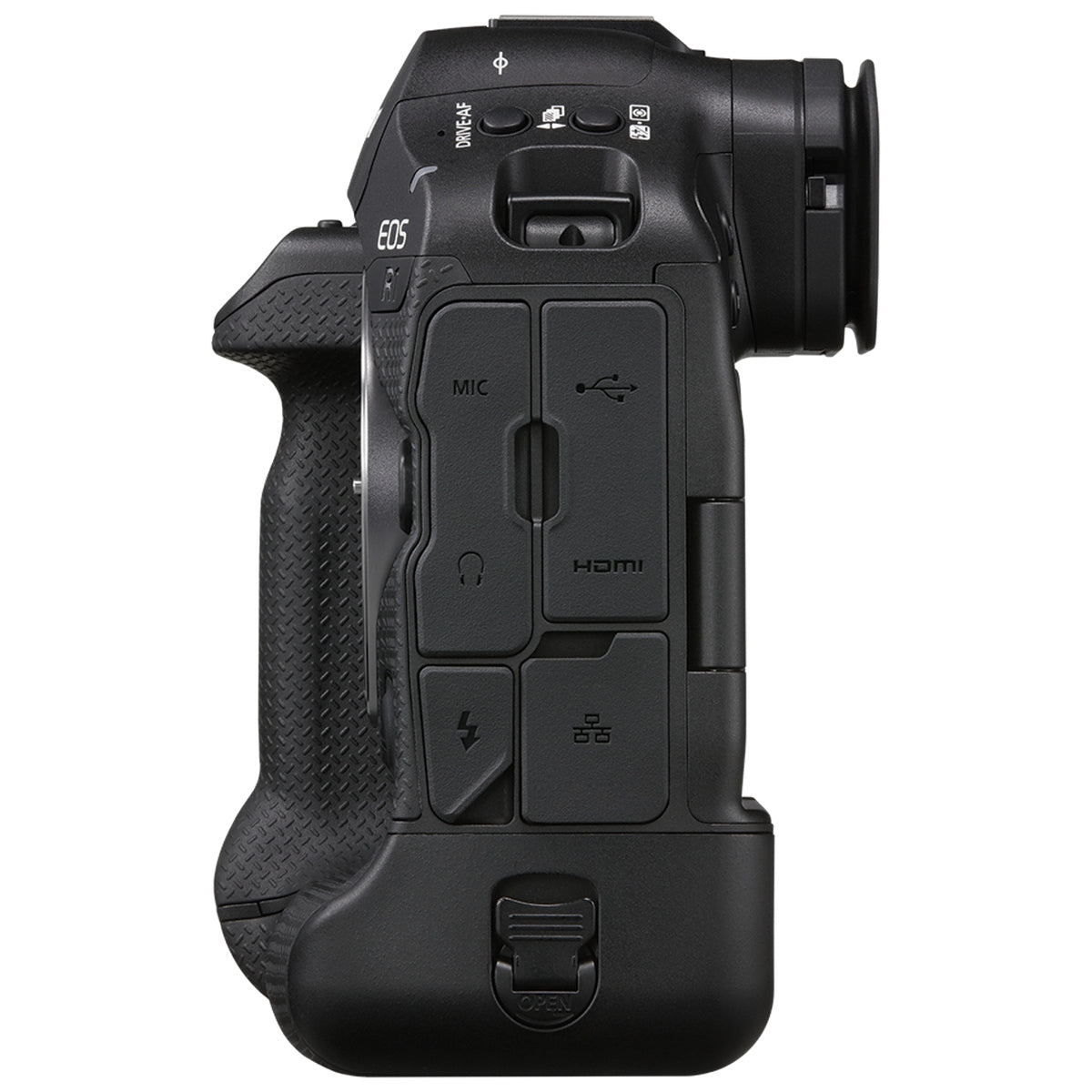
| USB Terminal: | Equivalent to Super Speed Plus USB (USB 3.2 Gen 2)• For PC communication; video calls/streaming• Terminal type: USB Type-C• Shared with terminal for in-camera charging with USB Power Adapter PD-E 1. |
| HDMI Out Terminal: | HDMI output terminal (Type A)• HDMI CEC not supported• Images may not be displayed unless [For NTSC] or [For PAL] is set correctlyfor the TV video system. |
| Clean HDMI Output: | Provided |
| Microphone terminal: | 3.5 mm diameter stereo mini jack |
| Headphone terminal: | Compatible with 3.5 mm diameter stereo mini-plug |
| Battery: | LP-E 19* LP-E 4 N / LP-E 4 cannot be used. Unauthenticated batteries can also be used, but safety cannot be guaranteed. |
| Optional Battery Grip: | Not supported |
| Battery Check: | Automatic battery check with 6-level display when the power switch is turned ON.Displayed in 6 levels in viewfinder, and on LCD screen.Battery info display in Set-up Menu:• Remaining capacity percentage• Shutter count, on current battery charge• Recharge performance (battery's ability to hold charge; displayed in 3 levels) |
| Start up Time: | Approx. 0.4 sec.• Based on CIPA testing standards. |
| Dimensions (Wxhxd): |


Selling fast!
Get yours while you can.